When a client pays an invoice, the amount that actually lands in your bank account depends on two things: the exchange rate that day and what your payment provider charges. Fieldfare tracks both, so you always know what you actually earned, not just what the invoice said.
Recording a payment
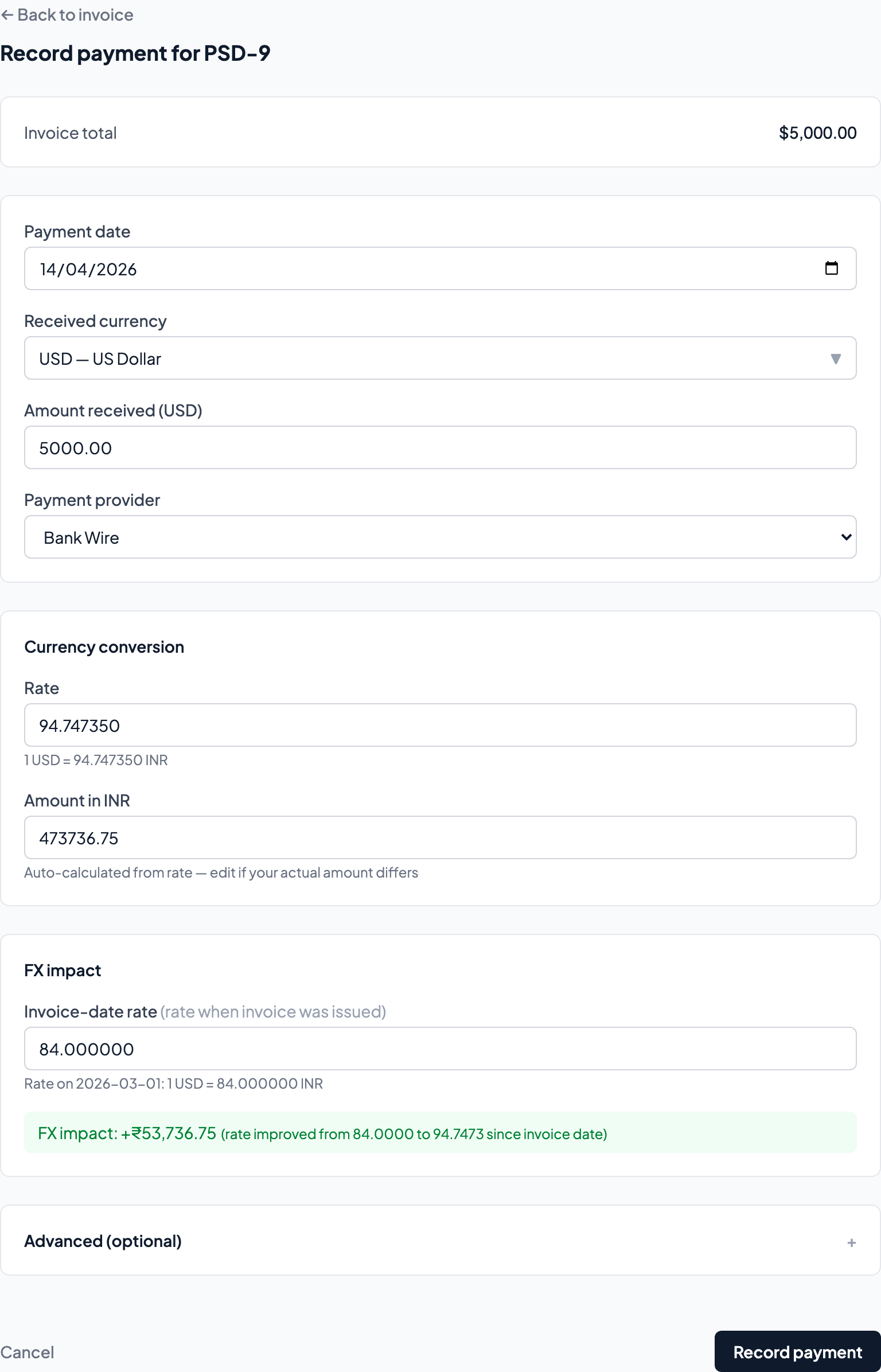
Open an unpaid invoice and click Record payment. The flow walks you through everything:
- Payment provider — Select how you received the money: Wise, PayPal, Payoneer, bank wire, or any custom provider you've configured. (Set up providers in Settings.)
- Payment date — The day the money arrived in your account. This determines which exchange rate is used.
- Exchange rate — Auto-filled from ECB or Open Exchange Rates data for the payment date. If your actual rate was different (Wise shows you the exact rate on each transaction), you can override it.
- Amount in home currency — Calculated automatically from the rate. Also editable if you want to enter the exact amount you received.
- Estimated provider fees — Calculated from your provider's configured fee structure (percentage + fixed fee + FX markup). Override with the real amount if you know it.
FX impact
This is the number most freelancers never track, and it's often bigger than they expect.
FX impact is the difference between what an invoice was worth in your home currency on the day you sent it and what you actually received on the day you were paid. Exchange rates move between those two dates, sometimes in your favour, sometimes not.
Example: You invoice TechCorp $7,700. On the invoice date, USD/INR is 83.50, so the invoice is worth ₹6,42,950. The client pays three weeks later when USD/INR is 84.20, and you receive ₹6,48,340. That's +₹5,390 in FX gain. Real money that would never show up in a simple spreadsheet tracker.
If the rate had moved the other way (say USD/INR dropped to 82.80), you'd see a ₹5,390 FX loss instead. Over a year of invoicing, these movements can add up to tens of thousands of rupees in either direction.
Fieldfare shows FX gains in green and losses in red, both on individual payments and aggregated in your P&L.
Provider fees
When you record a payment, Fieldfare estimates the fees based on your provider's configured fee structure: a percentage fee, a fixed fee per transaction, and an FX markup.
These are estimates. Actual fees vary slightly per transaction, per currency pair, and per payment method. The goal isn't exact-to-the-penny accounting; it's visibility. When you can see that PayPal took roughly $175 off a $5,000 payment while Wise would have taken $25, that's actionable information.
You can always override the estimated fee with the real amount from your provider's transaction history. Over time, this makes your P&L increasingly accurate.
Why this matters
The invoice amount is not what you earned. What you earned is the invoice amount, adjusted for the exchange rate on the day you were paid, minus the fees your provider took. That adjusted number is what appears in your P&L, and it's often 3-7% different from the invoice face value.
For a freelancer billing $5,000–10,000/month internationally, that 3-7% is $150–700/month that's invisible without tracking. Fieldfare makes it visible.